# 备份
网站的定期备份和重要操作之前的备份工作(如系统升级或重要修改)无比重要,可以做到防范于未然,让发生了意外而能够进行复原,这是网站运维工作的重中之重。
KODExplorer的备份有基于服务器快照自动备份、手动本地备份等方式,各有利弊,建议结合起来使用
## [服务快照自动备份](/kodexplorer-image-guide/kodexplorer-ke-dao-yun-jing-xiang-shou-ce-1/bei-fen.md#501)
云服务器厂商都会提供一个叫“快照”的功能,快照是针对于服务器的磁盘来说的。快照工具可以记录指定时间点硬盘的数据,全部备份起来,并可以实现一键恢复。
如果您对磁盘进行了自动的快照设定,如下场景您便可以比较从容的面对: 1、工作了几天的成果,被误删了 2、黑客把把网站网站弄的面目全非 3、现在的内容已经乱七八糟了,我要回到一个正常的服务器状态
做了快照备份,一键恢复到备份时间点的状态。也就是现场还原,很好的功能。
不同的云厂商快照设置稍有差别,具体参考:
* [阿里云快照制作](http://www.websoft9.com/xdocs/ecs#601)
* [腾讯云快照制作](http://www.websoft9.com/xdocs/ecs#602)
## [手工本地备份](/kodexplorer-image-guide/kodexplorer-ke-dao-yun-jing-xiang-shou-ce-1/bei-fen.md#502)
手工本地备份主要是通过下载应用程序文件和备份导出数据库文件,建议备份周期每月一次,备份文件保存6个月左右。下面就具体的备份操作进行说明:
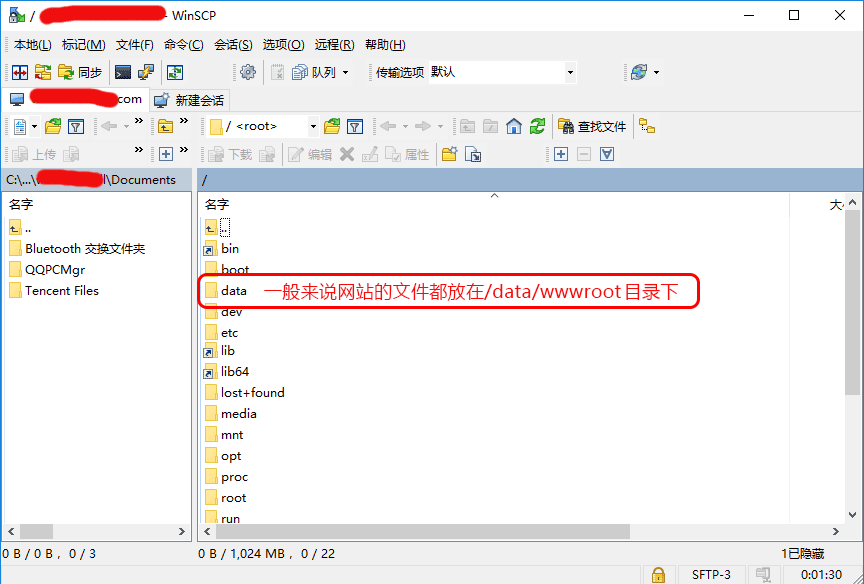
1. 下载网站源文件 √ 若是Windows系统请通过远程桌面直接把C:/websoft9/wampserver/www 目录拷贝 √ 若是Linux系统请通过SFTP工具登录到服务器(见下图),将网站目录完整的下载到本地(如果文件数量比较多,建议压缩后再下载)
2. 通过浏览器进入PhpMyAdmin(网址:
3. 左侧菜单中选择所需的数据库,顶部导航栏上选择“导出”标签
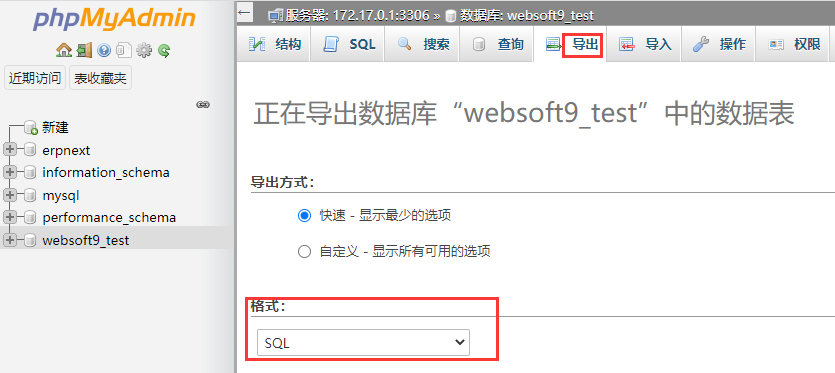
4. 选择导出方式和格式(建议SQL),点击“执行”,导出文件后下载到本地
5. 将程序文件和数据库文件放到同一个文件夹,根据日期命名,备份工作完成
---
# Agent Instructions: Querying This Documentation
If you need additional information that is not directly available in this page, you can query the documentation dynamically by asking a question.
Perform an HTTP GET request on the current page URL with the `ask` query parameter:
```
GET https://websoft9.gitbook.io/kodexplorer-image-guide/kodexplorer-ke-dao-yun-jing-xiang-shou-ce-1/bei-fen.md?ask=
```
The question should be specific, self-contained, and written in natural language.
The response will contain a direct answer to the question and relevant excerpts and sources from the documentation.
Use this mechanism when the answer is not explicitly present in the current page, you need clarification or additional context, or you want to retrieve related documentation sections.