> For the complete documentation index, see [llms.txt](https://websoft9.gitbook.io/bt-linux-image-guide/llms.txt). Markdown versions of documentation pages are available by appending `.md` to page URLs; this page is available as [Markdown](https://websoft9.gitbook.io/bt-linux-image-guide/bt-bao-ta-mian-ban-jing-xiang-shou-ce-linux-1/ru-he-jin-hang-yu-ming-she-zhi.md).
# 如何进行域名设置?
域名设置分为两个步骤:
## [步骤1:域名控制台解析域名](/bt-linux-image-guide/bt-bao-ta-mian-ban-jing-xiang-shou-ce-linux-1/ru-he-jin-hang-yu-ming-she-zhi.md#1001)
如果您的域名备案(大陆之外无需备案),可以通过云厂商的域名控制台进行域名解析,操作如下:
1. 登录域名控制台->域名解析,进入解析设置界面(以阿里云为例)
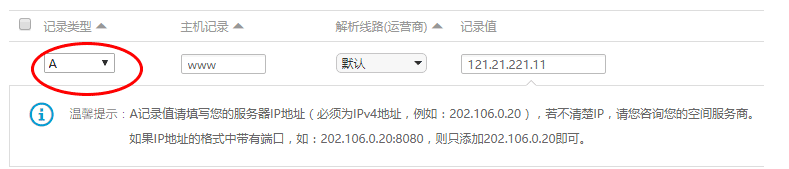
2. 增加一条A记录,主机记录那里填写二级域名的前缀(如www,shop,test等)或通配符@,记录值填写您的服务器公网ip地址,保存
3. 域名解析成功,等待解析生效(不同的厂商解析生效时间不一样,1分钟-24小时不等)
注意:解析生效之后,本地访问可能由于缓存问题导致仍然没有生效,请清空浏览器缓存,然后[通过CMD命令行刷新本地DNS操作](http://zhihu.websoft9.com/3615/如何刷新本地dns缓存)
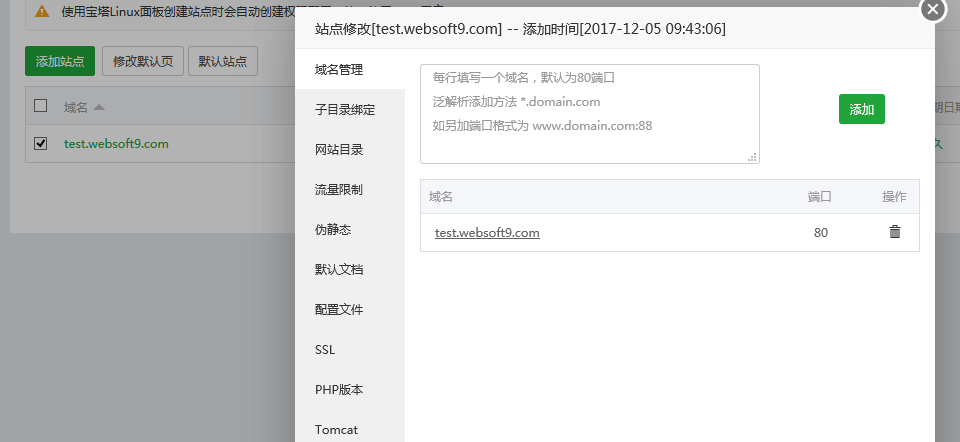
## [步骤2:新增网站或修改](/bt-linux-image-guide/bt-bao-ta-mian-ban-jing-xiang-shou-ce-linux-1/ru-he-jin-hang-yu-ming-she-zhi.md#1002)
在BT中,新增网站首先就要填写域名。如果是修改网站,先删除就域名,然后再增加域名